.png)
Chekkit Voice Troubleshooting
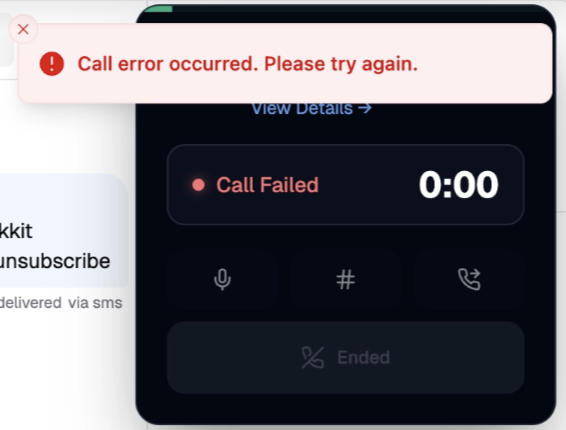
“Call Error Occurred”
If a Chekkit Voice call fails immediately or displays “Call error occurred. Please try again,” your browser may not have permission to access your microphone.
Chekkit Voice requires microphone access to make calls through your browser. If this permission is turned off, the call may fail before it connects.
Enable Microphone Access in Google Chrome
- Open the Chekkit Dashboard at dashboard.chekkit.io.
- Click the site controls icon to the left of the website address in your browser.
- Find Microphone in the permissions list.
- Turn the microphone permission on.
- Refresh the Chekkit Dashboard.
- Try placing the call again.
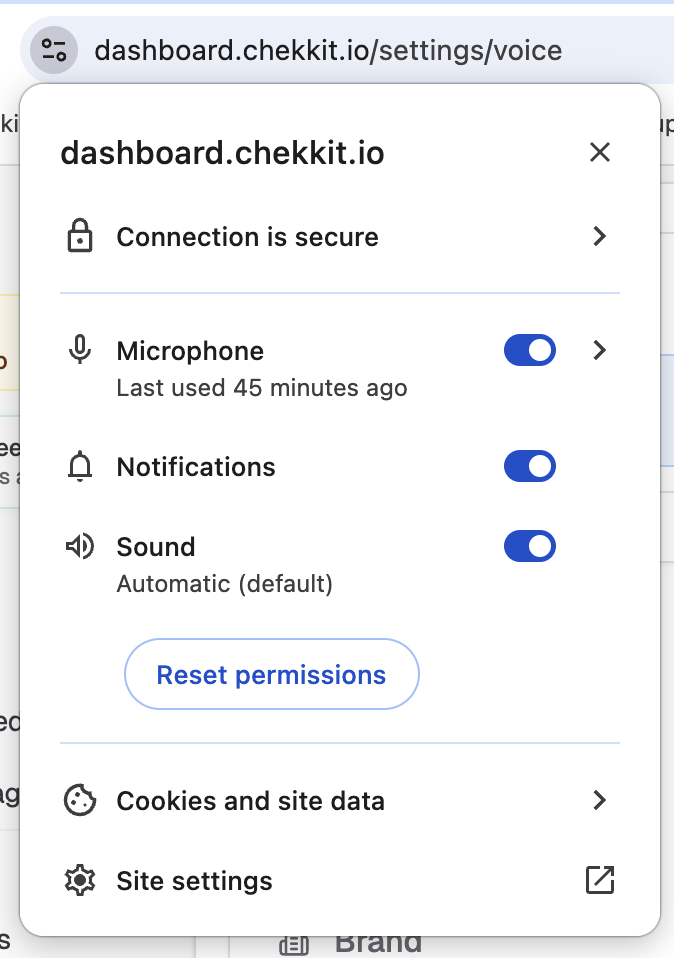
If you do not see the Microphone option:
- Click Site settings.
- Find Microphone under Permissions.
- Change the setting to Allow.
- Return to Chekkit and refresh the page.
Check Your Computer’s Microphone Permissions
Your browser permission may be enabled while microphone access is still blocked by your computer.
macOS
- Open System Settings.
- Select Privacy & Security.
- Click Microphone.
- Make sure microphone access is enabled for Google Chrome or your preferred browser.
- Restart the browser after changing the permission.
Windows
- Open Settings.
- Select Privacy & security.
- Click Microphone.
- Turn on Microphone access.
- Make sure your browser is allowed to access the microphone.
- Restart the browser after changing the permission.
If Calls Are Still Failing
Try the following:
- Refresh the Chekkit Dashboard.
- Close and reopen your browser.
- Confirm that your microphone is connected and not muted.
- Disconnect and reconnect any Bluetooth headset.
- Make sure another application is not preventing access to the microphone.
- Confirm that the correct microphone is selected in your computer’s sound settings.
- Sign out of Chekkit, sign back in, and place another test call.
Contact Chekkit Support
If the problem continues, contact support@chekkit.io and include:
- A screenshot of the error
- The browser and device you are using
- The approximate date and time of the failed call
- Whether all calls are failing or only calls to a specific number
This information will help our team investigate further.