.png)
Connect QuickBooks to Chekkit
Connect QuickBooks Online to Chekkit to text customers when an invoice goes out or a payment comes in — with ready-made automations for invoice notices, payment thank-yous, and review requests.
What it does
- Links your QuickBooks Online company to Chekkit when you sign in to QuickBooks and approve the connection.
- Receives updates when an invoice is created or a payment is recorded.
- Offers one-click automations for an invoice notice, a payment thank-you, and a review request after payment.
- Lets you fine-tune any automation later from Automation → Events / Triggers.
Before you start
- You need owner or location admin access in Chekkit.
- You need a QuickBooks Online company, and permission in QuickBooks to connect apps.
- The customer in QuickBooks needs a phone number (primary or mobile) so Chekkit knows where to send the text.
How to connect
- In Chekkit, go to Automation → Events / Triggers.
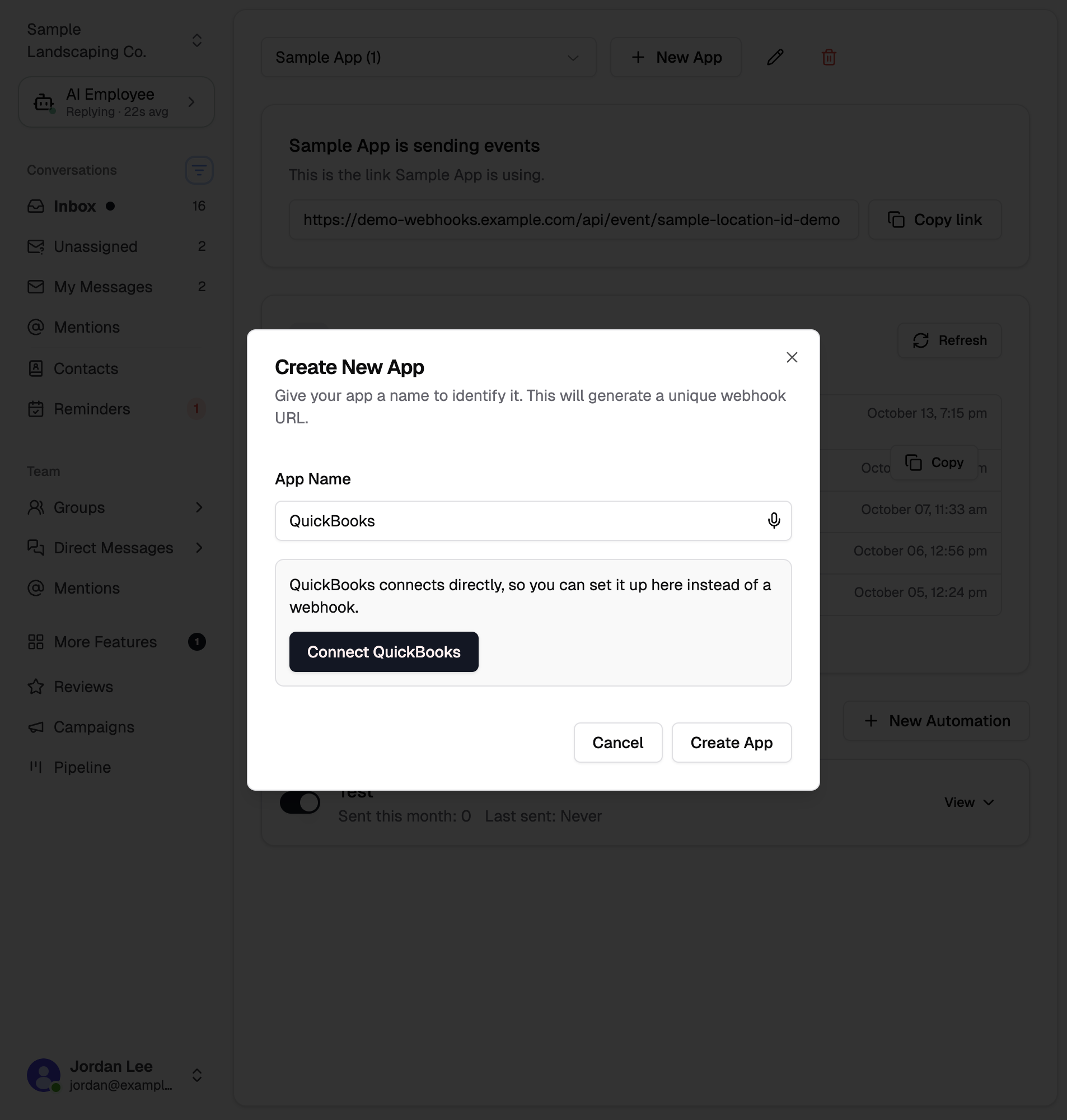
- Type QuickBooks where it asks which software should send the texts, then click Connect QuickBooks. If you already have apps, click New App, type QuickBooks, and click Connect QuickBooks.
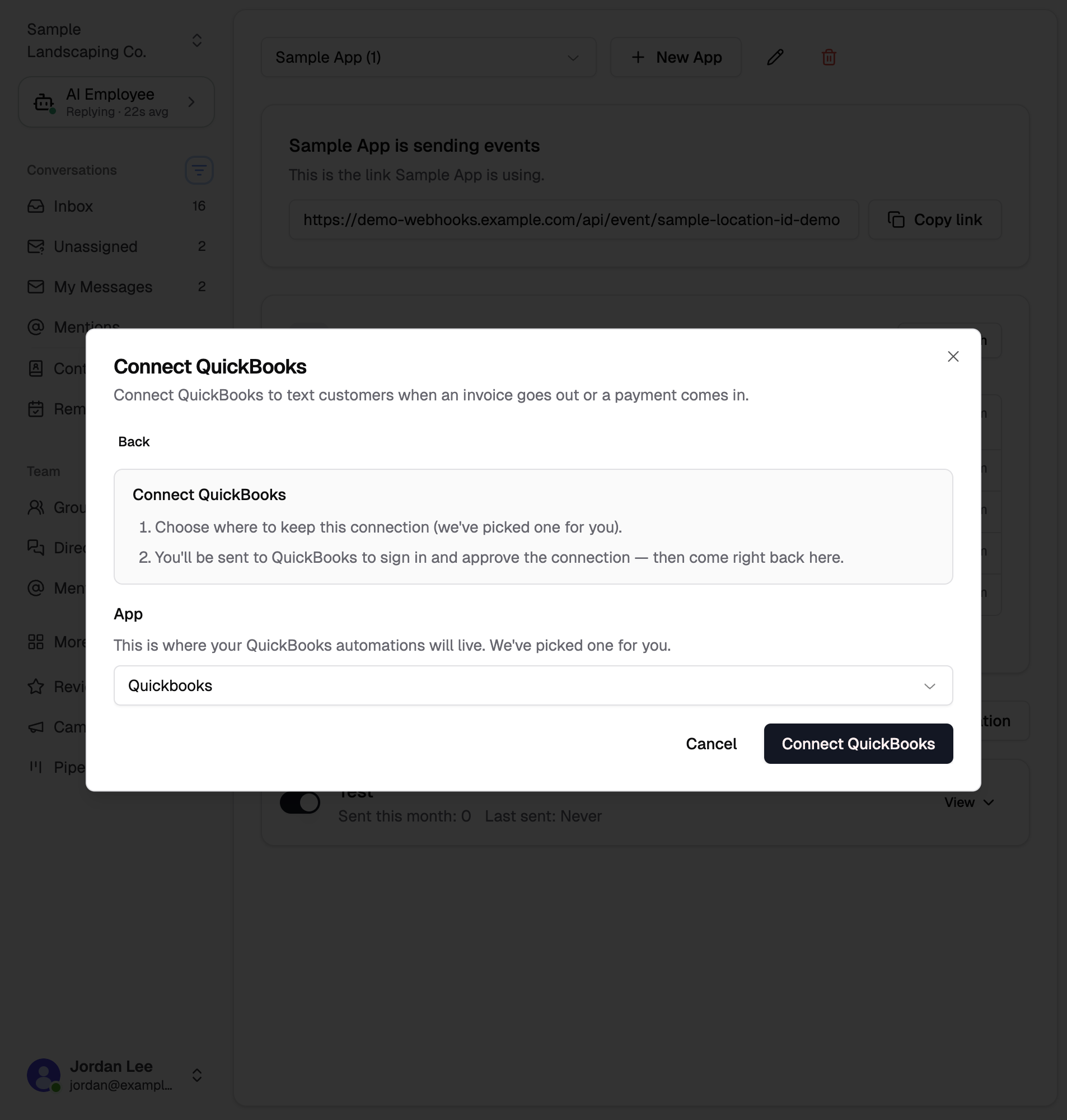
- Choose an app where this connection will live. Chekkit picks one for you by default; you can use an existing app or create a new one named QuickBooks.
- Click Connect QuickBooks. You'll be sent to QuickBooks to sign in and approve the connection, then returned to Events / Triggers.
You can also start from Settings → Connections → CRM & Tools: find QuickBooks under Business Tools & Integrations and click Connect. After you approve QuickBooks, you stay on that page and the row shows Connected.
Quick-setup automations
After QuickBooks is connected, Events / Triggers lists the automations you have not turned on yet. Click Turn on next to one, then Turn on automation.
From settings, click Set up automation on the QuickBooks row to open the same list.
| Automation | When it sends | What the customer gets |
|---|---|---|
| Invoice sent | When an invoice is created in QuickBooks | A text with the invoice number and total. |
| Payment received | When a payment is recorded | A thank-you that includes the payment amount. |
| Review request after payment | When a payment is recorded | A thank-you and your Chekkit review link. |
Payment received and Review request after payment both send when a payment is recorded. Turn on one, or both, depending on whether you want a receipt and a review ask.
Example invoice message (with sample data):
Hi Jane, your invoice #1042 for $250.00 is ready. Reply here with any questions — thank you!
Example payment thank-you:
Hi Jane, thanks! We've received your payment of $250.00. We appreciate your business.
Example review request:
Hi Jane, thank you for your payment! We'd love your feedback — it only takes a moment: [review link]
Real messages use the customer's name from QuickBooks, plus the invoice number and amount on that invoice or payment.
Already-added templates show as Added. You can turn the others on later.
After connecting
- Create a test invoice or record a test payment in QuickBooks for a customer that has your own phone number.
- The first matching event can take a moment to show on Events / Triggers. An automation that is already on will send once that event arrives.
- Open the automation on Events / Triggers to change the wording.
Disconnect QuickBooks
- In Settings → Connections → CRM & Tools, open QuickBooks and choose Remove.
- Confirm removal. Chekkit stops receiving QuickBooks updates, and automations triggered by QuickBooks stop sending.
- The automations stay in your account. Connect QuickBooks again when you want them to run.
If the QuickBooks row says Needs reconnect, click Reconnect and approve the connection again. You do not need to remove it first.
Troubleshooting
- Customers aren't receiving texts. Open the customer in QuickBooks and add a primary or mobile phone number.
- Nothing shows up after connecting. QuickBooks only sends an update when something happens there, like creating an invoice or recording a payment. Do that with a test customer, then check Events / Triggers.
- The QuickBooks row shows Needs reconnect, or a red alert. Click Reconnect and sign in to QuickBooks again. If that does not clear it, choose Remove and connect QuickBooks again.
- I want a different message or timing. Edit the automation on Events / Triggers.
Related articles
Need help?
If you're having trouble connecting QuickBooks or setting up automations, email support@chekkit.io with your business name and a short description of the issue.